
Inkjet support volumes#
Inkjet printers do not have an overhang angle the way fused-filament machines do. A voxel can be printed only if there is already material in the column directly below it. OpenVCAD treats that requirement as a volume problem: SupportAnalyzer samples a design, finds the empty space that would be printed over air, and returns that region as an ordinary implicit solid.
You can then fill the solid with support material, a lattice, or any other OpenVCAD node. Support generation is not an after-the-fact mesh repair step; it is another volume in the same tree.
This guide assumes you have completed Getting Started and Functional grading. The lattice example also uses the Metamaterials builders. When you later compile a design for a material-jetting printer, see the Material Inkjet compiler.
How the analyzer works#
The analyzer walks the model’s bounding box on a uniform voxel grid, from the top layer downward:
A voxel inside the part is occupied.
An empty voxel with occupied material above it is marked as support, and that support also counts as occupied for the next layer down.
An empty voxel with nothing above it stays empty.
The result is the downward-facing volume beneath the part, clipped to the part’s bounding box. analyze() converts that occupancy into an implicit solid so the rest of the OpenVCAD pipeline can use it like any other node.
voxel_size is the sampling pitch in millimetres. Every component must be positive; the analyzer uses the smallest component as a uniform voxel size. Finer voxels follow the part more closely and take longer to compute. Independent XY columns are processed concurrently.
Example 1: fill the support volume with material#
The complete example is
01_solid_support_fill.py.
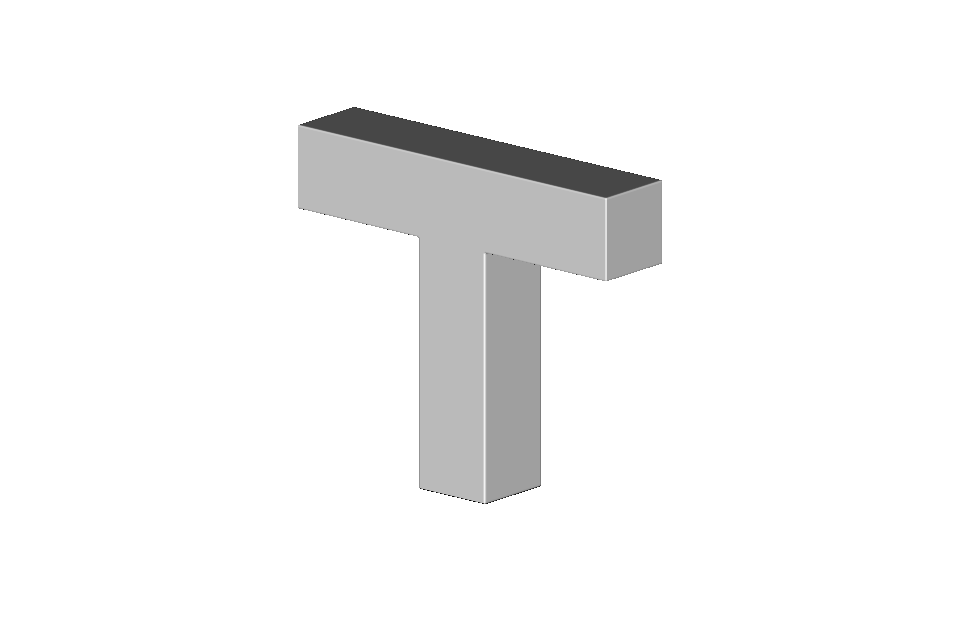
A T-bracket makes the unsupported region obvious: the stem sits on the build envelope, but each arm of the crossbar hangs in air.
import pyvcad as pv
import pyvcad_rendering as viz

materials = pv.default_materials
voxel_size = pv.Vec3(0.4, 0.4, 0.4)

stem = pv.RectPrism(pv.Vec3(0.0, 0.0, 9.0), pv.Vec3(6.0, 6.0, 18.0))
bar = pv.RectPrism(pv.Vec3(0.0, 0.0, 21.0), pv.Vec3(28.0, 6.0, 6.0))
part = pv.Union(stem, bar)

analyzer = pv.SupportAnalyzer(part, voxel_size)
support_volume = analyzer.analyze()

part.set_attribute(
    pv.DefaultAttributes.VOLUME_FRACTIONS,
    pv.VolumeFractionsAttribute([(1.0, materials.id("white"))]),
)
support_volume.set_attribute(
    pv.DefaultAttributes.VOLUME_FRACTIONS,
    pv.VolumeFractionsAttribute([(1.0, materials.id("cyan"))]),
)

root = pv.Union(part, support_volume)
viz.Render(root, materials)
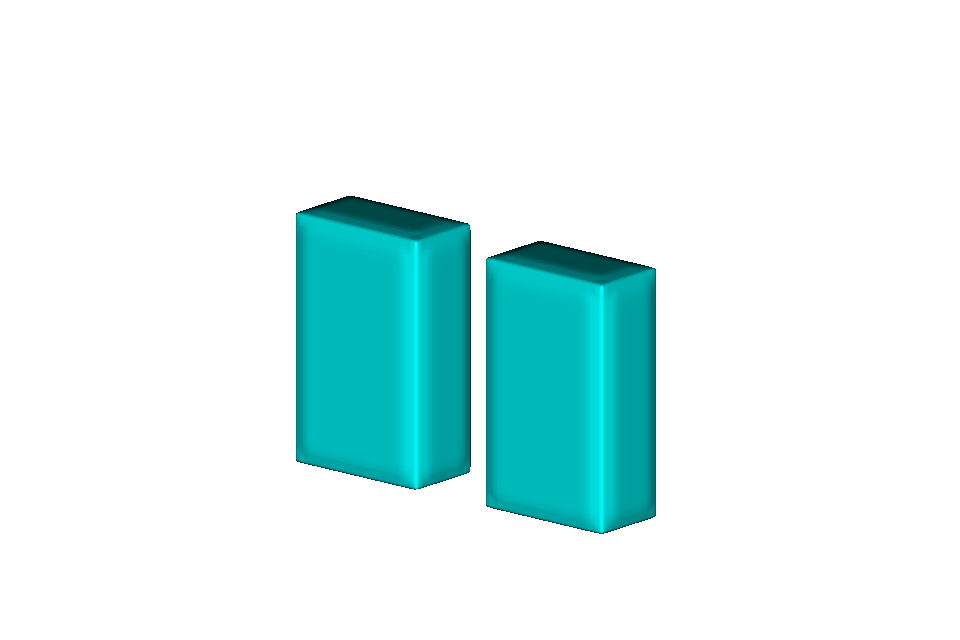
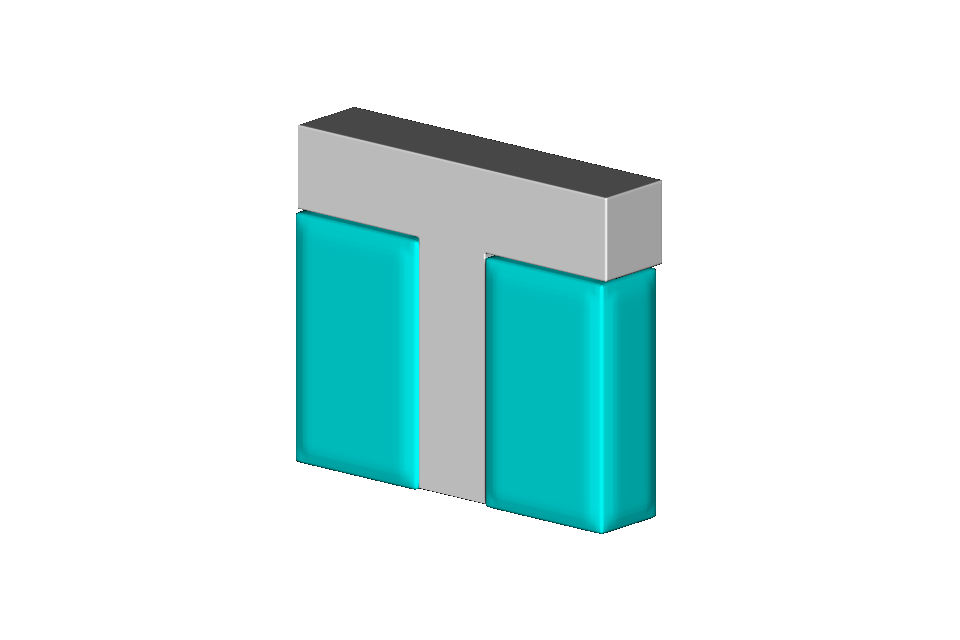
The returned support_volume is already an implicit solid. Assigning a volume-fraction attribute is the naive fill: every support voxel becomes one support material. Union it with the part when you want both volumes in the same preview or compiler tree.
Example 2: fill the support volume with a micro-lattice#
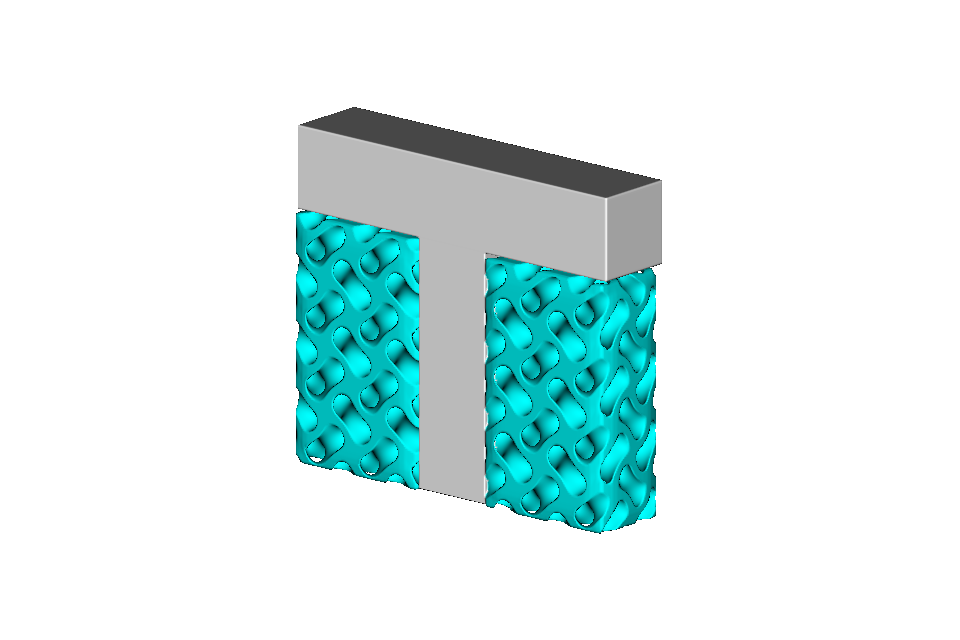
Inkjet workflows often print a sparse lattice in the support region instead of a solid block. Because the analyzer returns a normal OpenVCAD solid, that is just an intersection against a tiled unit cell. The complete example is
02_lattice_support_fill.py.
import pyvcad as pv
import pyvcad_metamaterials as mm
import pyvcad_rendering as viz

materials = pv.default_materials
voxel_size = pv.Vec3(0.4, 0.4, 0.4)

stem = pv.RectPrism(pv.Vec3(0.0, 0.0, 9.0), pv.Vec3(6.0, 6.0, 18.0))
bar = pv.RectPrism(pv.Vec3(0.0, 0.0, 21.0), pv.Vec3(28.0, 6.0, 6.0))
part = pv.Union(stem, bar)

analyzer = pv.SupportAnalyzer(part, voxel_size)
support_volume = analyzer.analyze()

bbox_min, bbox_max = support_volume.bounding_box()
lattice_support = pv.Intersection(
    mm.gyroid(
        mm.rectangular_cell_map(
            (bbox_min, bbox_max),
            cell_size=pv.Vec3(5.0, 5.0, 5.0),
        ),
        wall_thickness=0.7,
    ),
    support_volume,
)

part.set_attribute(
    pv.DefaultAttributes.VOLUME_FRACTIONS,
    pv.VolumeFractionsAttribute([(1.0, materials.id("white"))]),
)
lattice_support.set_attribute(
    pv.DefaultAttributes.VOLUME_FRACTIONS,
    pv.VolumeFractionsAttribute([(1.0, materials.id("cyan"))]),
)

root = pv.Union(part, lattice_support)
viz.Render(root, materials)
The gyroid is tiled through a rectangular cell map that covers the support bounds, then clipped with Intersection. No conformal mapping is required. Any catalog cell from the metamaterials builders can replace the gyroid.
API notes#
SupportAnalyzer(input_model, voxel_size) constructs the analyzer. analyze() returns an implicit solid for the support occupancy and does not modify the input model. Independent XY columns are processed concurrently.
bounding_box() is safe to call on the returned solid before prepare(), which is why the lattice example can size its cell map directly from the support volume.
The Python API reference is under Analysis.
Limitations#
The analyzer fills downward only to the bottom of the input model’s bounding box, not to an independent build plate. A floating part whose bounding box does not reach the bed will not grow supports down to
z = 0. Include the bed in the model, or union a sacrificial plate into the analyzed tree, if you need that extra height.Occupancy is sampled on a uniform Cartesian grid. Features smaller than
voxel_sizecan be missed, and the occupancy-to-implicit conversion slightly rounds sharp edges.The current rule is generic inkjet occupancy: material is required directly below each voxel. There is no FFF-style overhang-angle threshold and no automatic raft, contact-point thinning, or soluble-interface shell.
analyze()clones the input tree internally. You can keep editing the original part after analysis.
./.venv/bin/python examples/analysis/01_solid_support_fill.py
./.venv/bin/python examples/analysis/02_lattice_support_fill.py